Table of Contents
- Check Liveroom Setup
- Check Environment
- Prepare LIVE Scripts
- Pin products to your livestream
- Post teaser videos
Check Liveroom Setup
Lighting
Ideal lighting involves using natural daylight or a ring light. For good lighting, use multiple lights to avoid shadows, and test in advance to prevent over-exposure. Avoid dark or uneven lighting with shadows.
Cell phones and standee
Use one phone, ideally two, both fully charged: one for live streaming and the other for listing products and managing comments. An adjustable tripod is recommended.
Prompter (optional)
Additionally, have a screen and laptop, an iPad, or a paper prompter for extra support.
Check Environment
Highlight benefits
Highlight benefits using digital stickers, such as discounts, promotions, goodie bags, and free shipping.
Use different camera angles
Utilize different camera angles, including close-ups for details and wide shots for the overall fit.
Make important keywords
Mark important keywords, including the brand logo. For fashion products, also mark the presenter’s weight, height, and size.
Prepare LIVE Scripts
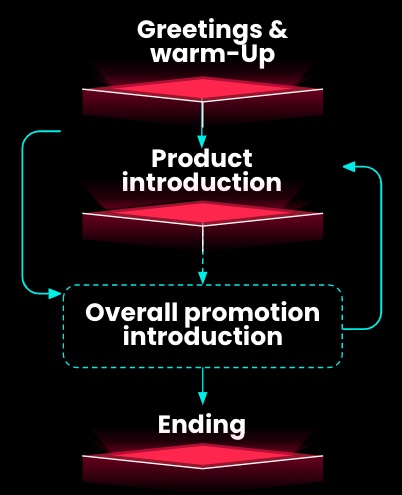
We recommend your LIVE scripts to follow the 4-part structure. Each part contains key messages to deliver to your audience.
Greetings & warm-up
The first few minutes are important for creating a friendly and exciting environment.
Product introduction
This is when you can showcase your products and convince viewers to buy by pinning them and introducing general product features. Prepare a list with each product’s unique selling points and characteristics.
Overall promotional intro
During the LIVE, the audience comes and goes. That’s why we encourage you to repeat what to expect in the livestream, for example greetings & warm-up tips.
Ending
Remember to end with something that may draw the audience back to your next livestream. Thank the audience for their time and attention. Announce upcoming livestreams, promotions, and events if applicable, etc.
Pin products to your livestream
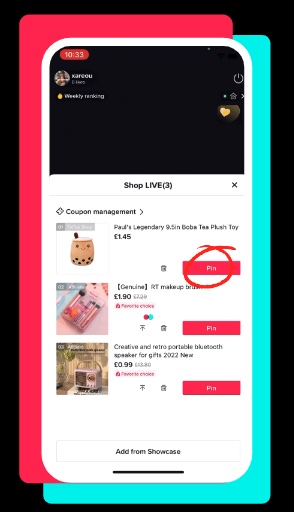
During LIVE, Click the shopping bag icon on the bottom-left corner. Then show the “Shop LIVE” list.
Click the “Pin” button alongside each item you have successfully added to your livestream.
Click “Add from showcase” and tap the “⬆stick to the top” button to update the product sequence.
Post teaser videos
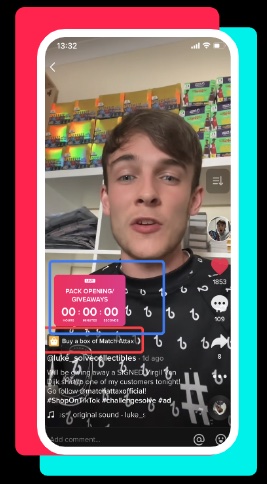
Post at least one teaser video one day prior and boost it two hours before going LIVE.
Ensure TikTok Shopping products are added to the videos.
Each video should be less than 30 seconds long.
Use the countdown sticker to show the livestream time.
Post teaser videos on TikTok and other social media channels.